One host, the whole room
Share the sound, not the earbuds.
SyncEar plays whatever is on one phone to everyone around you, each on their own earphones, in sync. On a bus, in bed, at a match, or anywhere a speaker will not do.
Why SyncEar
Sound was never made to share.
Every day, people crowd around one phone and settle for less. SyncEar ends the compromise, sending the audio straight to everyone's own earphones.
Two people, one pair of earbuds.
Watching a video on a bus or in bed, you split a single pair of earbuds and both strain to hear. With SyncEar you each listen on your own, at full quality.
Too quiet for some, too loud for the room.
Turn a phone speaker up and you disturb everyone. Turn it down and no one hears it. SyncEar sends the sound only to the people who join.
A match everyone wants, where you cannot blast it.
A dorm, an office, a quiet flat late at night. Everyone hears the game or the movie in their own earphones, at their own volume, in time with each other.
How it works
Find the sound around you, in three taps.
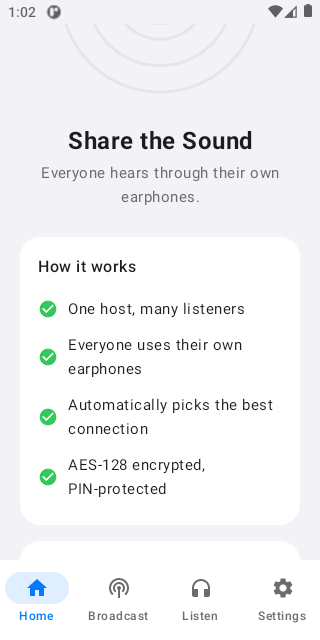
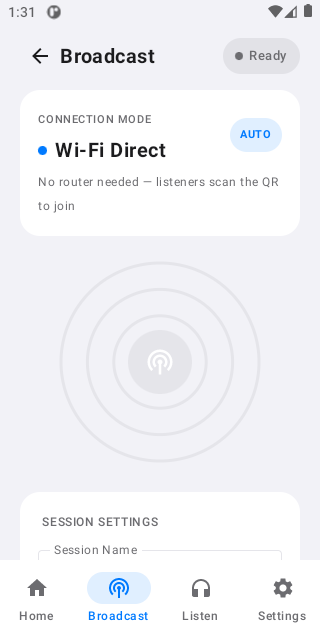
No pairing menus, no cables, no router. SyncEar handles the connection and keeps every listener locked to the same moment, over Bluetooth LE Audio or WiFi.
Find
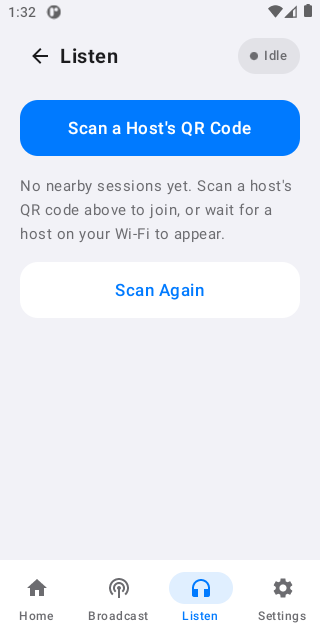
Open SyncEar and it scans for nearby sessions automatically.
Join
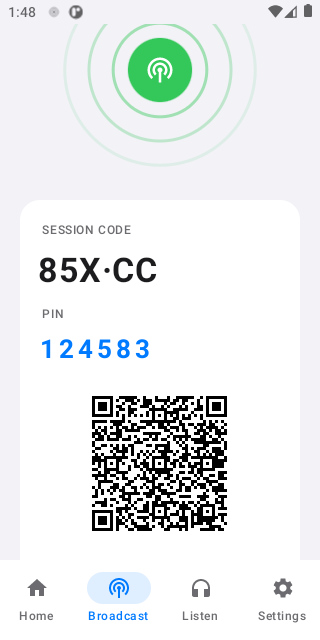
Tap a session and enter its passphrase. The audio is encrypted, so only invited listeners get in.
Listen
Hear it on your own earphones, in sync with the whole room. Nothing is recorded or stored.
Inside the app
Clean, and out of the way.
Download
Get SyncEar on your device.
Free on Android, Windows, and Linux. Install it on the host and every listener, then share a passphrase to start.

Windows
Download for WindowsInstalls SyncEar and adds a desktop shortcut. No Java needed. Portable .zip